Log in to Calabrio for RingCX (legacy)
The login page allows you to log in using your Calabrio for RingCX credentials or an external identity provider. Before a user can log in, an administrator has to create an identity for the user in Calabrio for RingCX. Administrators must navigate to Application Management > User Configuration > Users to create new users.
Prerequisites
- An administrator has created your user identity in Calabrio for RingCX.
- You have received an activation email from Support Services.
-
Direct login is the default login. You can change your default login configuration on the Set up IAM authentication page. Your administrator can configure an external IdP or multi-factor authentication on the IAM Authentication page.
Procedures
 Activate your Calabrio for RingCX account
Activate your Calabrio for RingCX account
- Follow the link provided in your activation email from Support Services. The link directs you to reset your password on the Calabrio for RingCX login page.
-
Enter a unique password that adheres to the password complexity requirements detailed below.
IMPORTANT The link in your activation email can only be used once, and it works for 24 hours. If you were not able to use the link in your activation email follow the troubleshooting procedure Troubleshoot legacy login issues
Log in to Calabrio for RingCX
Log into Calabrio for RingCX with your Calabrio for RingCX credentials
Follow this procedure if your organization does not use an external identity provider.
-
Navigate to the Calabrio for RingCX login page based on your region.
https://login.calabriocloud.com/
https://login-eu.calabriocloud.com/
https://login-aus.calabriocloud.com/
https://login-ca.calabriocloud.com/
https://login-uk.calabriocloud.com/
https://login-sgp.calabriocloud.com/
- Enter the email address associated with your Calabrio for RingCX account.
- Click Next.
- Enter the password associated with your Calabrio for RingCX account.
- Click Next. If successful, you are directed to Calabrio for RingCX.
Log into Calabrio for RingCX using your organization’s external identity provider
Follow this procedure if your organization does use an external identity provider.
-
Navigate to the Calabrio for RingCX login page based on your region.
https://login.calabriocloud.com/
https://login-eu.calabriocloud.com/
https://login-aus.calabriocloud.com/
https://login-ca.calabriocloud.com/
https://login-uk.calabriocloud.com/
https://login-sgp.calabriocloud.com/
- Enter your email address.
- Click Next.
-
Click Company Login. You may see Direct Login and Company Login buttons depending on your organization.
NOTE You may be redirected to your organization’s external identity provider to authenticate your session. If so, follow the onscreen prompts to authenticate.
- Enter your password.
- Click Next. If successful, you are directed to Calabrio for RingCX.
Log into Calabrio for RingCX using multi-factor authentication
Follow this procedure if your organization uses multi-factor authentication.
-
Navigate to the Calabrio for RingCX login page based on your region.
https://login.calabriocloud.com/
https://login-eu.calabriocloud.com/
https://login-aus.calabriocloud.com/
https://login-ca.calabriocloud.com/
https://login-uk.calabriocloud.com/
https://login-sgp.calabriocloud.com/
- Enter the email address associated with your Calabrio for RingCX account.
- Click Next.
- Enter the password associated with your Calabrio for RingCX account.
-
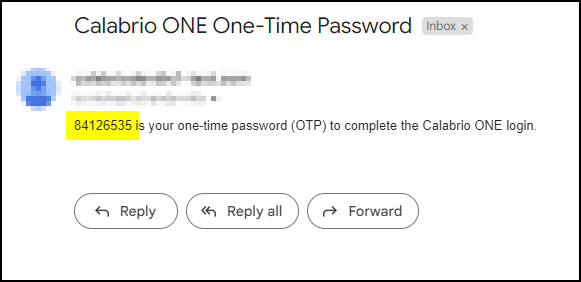
Calabrio for RingCX automatically sends an email to your account with a one-time password. Navigate to your email account and copy the one-time password located in the body of the email.
IMPORTANT The password expires in five minutes.
-
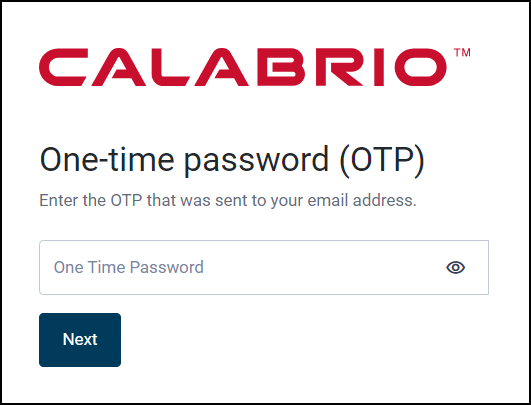
Enter the one-time password on the Calabrio for RingCX login page.
-
Click Next. If successful, you are directed to Calabrio for RingCX.
NOTE If you do not receive a one-time password email within one minute, check your spam folder or work with your IT administrator to ensure the one-time password email from "supportservices_noreply@calabriocloud.com" is not blocked.
Password complexity requirements
Passwords must conform to the following rules.
- Must be a minimum of 8 characters.
-
Must contain at least one of each of the following.
Uppercase letters
Lowercase letters
Numbers 0-9
Special characters! # $ % & ( ) , . / : ; = ? @ ^ ` | - Cannot contain your name or email address.
NOTE Passwords do not expire.
Related topics